
 CRM Data Enrichment
Automatically fix invalid emails
in your CRM
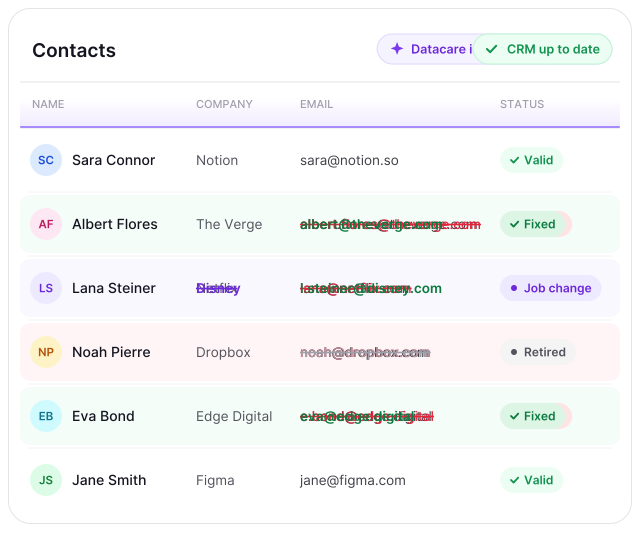
Datacare continuously replaces bad emails with the right ones, so you get more conversations and deals from the prospects and customers you already have.
Or upload 1,000 contacts to see how much of your CRM is outdated


 SOC 2 Type II
 GDPR compliant




Trusted by teams who rely on accurate CRM data to run their GTM


Emails in your CRM go bad all the time
People change jobs or retire, companies change domains, and some emails were wrong from the start. The result? More bounced emails, unreachable prospects you paid for and repeated manual cleanups.
Book Your Free CRM Audit
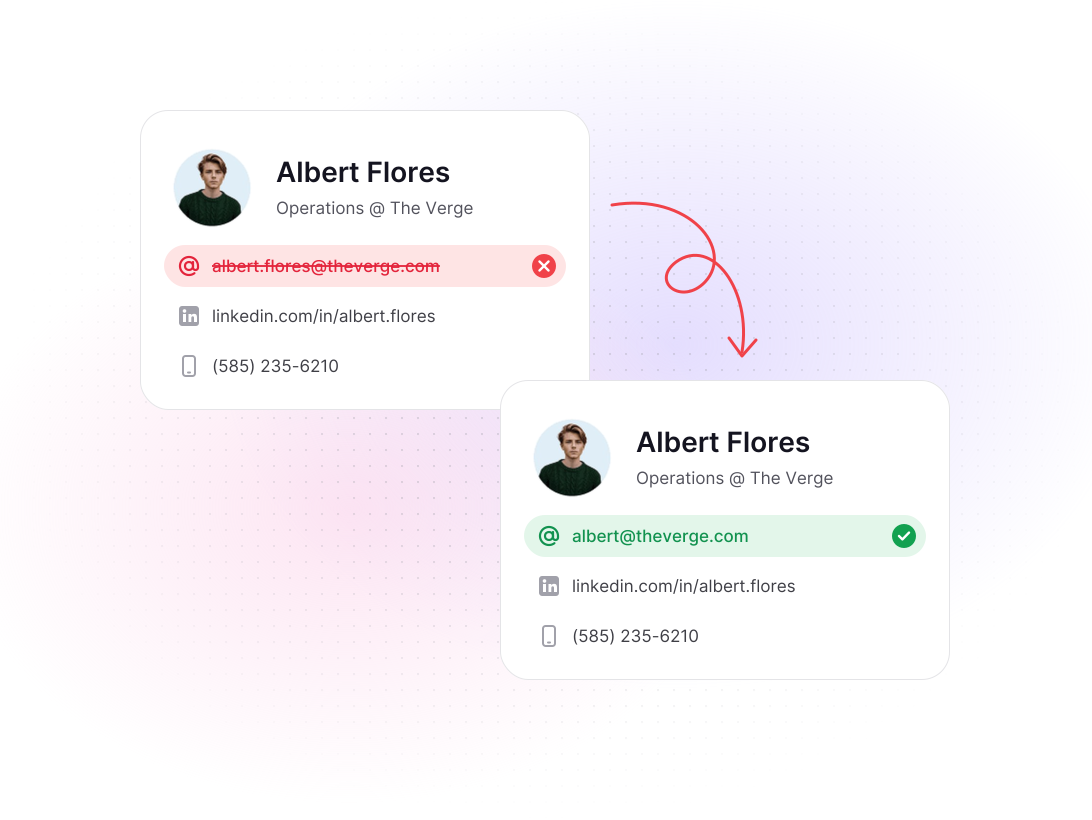
Datacare keeps the emails in your CRM up to date
Datacare checks every email in your CRM, old and new, and replaces the bad ones with verified emails (no more manual cleanups). Your sales and marketing teams can trust the CRM again, and the contacts already in it become reachable pipeline.
Book Your Free CRM AuditWhat bad emails are costing you and how Datacare fixes the problem
What bad emails cost you

Contacts with invalid emails are excluded from campaigns and never fixed.
The contacts you paid for go bad and become unusable.
Your team exports, verifies and re-uploads the CRM before every campaign.
Bad emails bounce, which hurts your sender reputation.
What changes with Datacare
Datacare finds their current email and makes them usable contacts for your campaigns.
Datacare fixes them, so you keep getting value from the data you bought.
Datacare checks and maintains emails automatically inside your CRM (no exports).
Every email Datacare adds is verified in real time, with a <5% bounce rate guarantee.

From bad emails to a healthier CRM in under two weeks
Free CRM audit
We run a read-only scan of a large sample of your CRM and walk you through how many emails are bad and how many Datacare can fix. Nothing in your CRM changes.
Set up around how you work
You decide how Datacare handles invalid emails in your CRM, which fields it updates, and whether existing data is replaced. Our team helps configure everything to fit your workflows.
Keeps your emails up to date
Once Datacare is live, it checks and replaces bad emails in the background, for the contacts already in your CRM and every new one as soon as it's added.
Integrate natively with your CRM
Datacare works with all major CRMs through native API integrations. If your CRM isn't listed, contact us - we add new integrations regularly.


Safe to connect, and you stay in control
Your data stays private and secure, and nothing in your CRM changes without your say.

SOC 2 Type II, hosted in the EU
Datacare is independently audited and penetration tested, and it complies with GDPR and CCPA.

Only contacts and companies
Datacare only sees your contacts and companies (John Smith at acme.com). Nothing else in your CRM is visible to it.

Your data stays yours
We never add your CRM data to our database or resell it.

No overwrites by default
Datacare only fills empty fields unless you allow updates, and you can keep the original emails if you want.

Every change logged
Check each update in your history and undo it in one click.

How Perpetual reduced CRM email bounce rates from 10% to under 2%
A HubSpot CRM of over 160,000 contacts, many added without checks, with a 10% bounce rate.
A CRM with a bounce rate under 2%, and open rates up from 12% to over 65%.

"You can't do any CRM work if your database is not up to date, not clean, and you can't activate it in a safe way." - Marie Cornen, CRM Marketing Manager, Perpetual
Datacare does more than fix emails
Also included in Datacare:
Fill every gap in your CRM on autopilot
Datacare fills in missing job titles, LinkedIn URLs, industry and company data, on new and existing records.
Learn more
Track job changes and turn them into opportunities
Datacare tells you when contacts move companies, so your team can reach them while the relationship is still warm.
Learn more
Catch the duplicates your CRM misses
Datacare finds the duplicate contacts and companies your CRM misses, even when they don't share the same email.
Learn more
Get started
How many valuable contacts are you losing to invalid emails?
Book a free CRM audit and see how many bad emails Datacare can fix, with nothing in your CRM changing.
Or upload up to 1,000 contacts to find out how much of your CRM data is outdated
Quick answers about fixing invalid emails in your CRM
Here are the most common ones we get.
You can, but an enrichment workflow has to be built, connected to data providers and fixed when it breaks, usually by someone technical. Each enrichment uses credits, and every refresh uses them again. Datacare runs inside your CRM with nothing to build, and it's priced by the size of your CRM, however often emails in the CRM need updating.
Verifying emails manually means exporting your CRM, running it through an email verifier, re-importing the valid emails and repeating it all before the next campaign. The invalid emails are just removed, so those contacts are lost. Datacare does this inside your CRM automatically, and it replaces bad emails with the right ones instead of dropping the contact.
Datacare finds and verifies each email in real time, at the moment it's needed, instead of pulling it from a stored database that may be out of date. That's why the emails are accurate, and why every email Datacare adds comes with a <5% bounce rate guarantee.
New contacts are verified and updated as soon as they're created. Datacare also refreshes your whole CRM every 30 days, so the emails already in it stay accurate.
You decide. Datacare can mark them with a status in a field of your choice, so your team knows who's safe to email, or it can remove them.
No. Built-in CRM enrichment fills in details like job titles, LinkedIn URLs and seniority, but it needs an existing business email to do it, and it doesn't find or replace emails. Datacare spots invalid emails and replaces them with verified ones.
Datacare only sees the contact and company fields it needs to work, like name, email and company. Nothing else in your CRM is visible to it.
Yes. Datacare is SOC 2 Type II certified, hosted in the EU and compliant with GDPR and CCPA, and we never add your data to our database or resell it.
Only in the way you set it up. By default Datacare only fills empty fields, and every change is logged, so it can be undone in one click.
Book your free CRM audit and we'll walk you through how Datacare would work with your CRM.