
HubSpot is one of the most powerful CRMs in the world, but it’s only as good as the data inside it. When that data is outdated, incomplete, or wrong, even the best features won’t save you.
If you want to sell effectively, you need context. Without it, sales teams chase dead leads, marketing emails miss the mark, and reps waste hours fixing records instead of closing deals. It’s like having a laser-guided missile with no laser.
That’s why data enrichment matters, even for HubSpot.
In this guide, we break down 10 of the best HubSpot data enrichment tools in 2026, how they work, and why top sales and marketing teams love them.
Findymail CRM Datacare plugs directly into HubSpot (and other major CRMs) to fix duplicates, verify emails, and keep records accurate, 24/7. No cluttered interfaces, no extra tabs. It runs quietly in the background, enriching and cleansing only the data that actually needs attention or by the rules you set.
Every demo includes a free CRM health check so you can see exactly where your data stands before anything changes.
|
TL;DR — HubSpot Data Enrichment Tools (2026) |
|
HubSpot data enrichment is the process of automatically enhancing CRM records with accurate, up-to-date information like job titles, company details, verified emails, phone numbers, firmographics, and technographics. Enriched data improves segmentation, email deliverability, lead scoring, automation performance, personalization, and overall revenue efficiency. Why HubSpot Data Becomes Unreliable Over Time CRM data decays fast due to job changes, company moves, role updates, email churn, manual entry mistakes, duplicate records, outdated contact info, and incomplete form fills. What Data Enrichment Fixes Automatically fills missing fields, verifies emails, removes duplicates, updates job changes, standardizes records, and keeps contact and company data fresh without manual research. Business Impact of Clean & Enriched Data
Best HubSpot Data Enrichment Tools (2026)
|
What is HubSpot Data Enrichment?
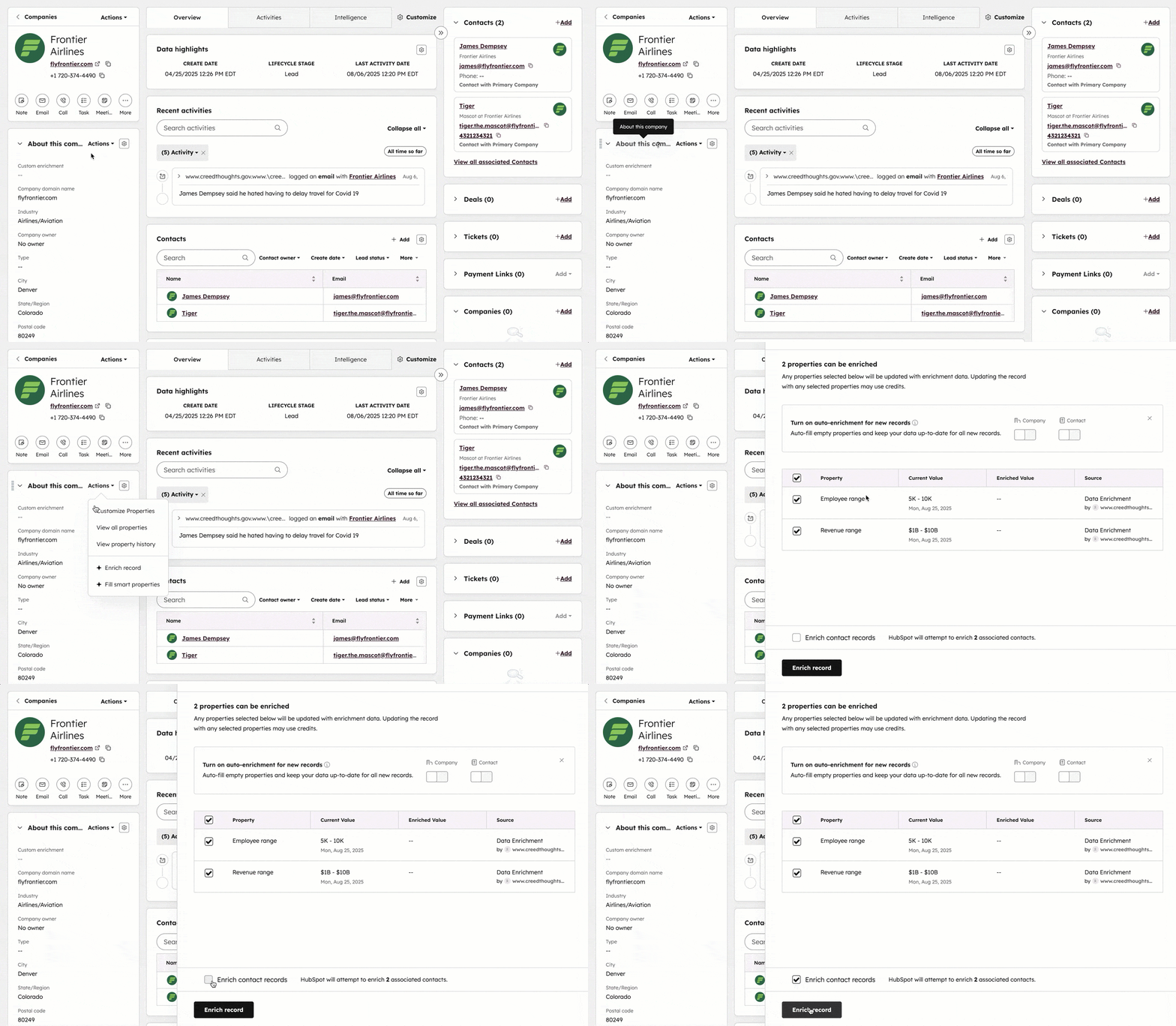
Before diving in, it’s important to understand what data enrichment means specifically within the HubSpot ecosystem.
HubSpot data enrichment is the process of automatically enhancing basic CRM records (such as a name or email address) with accurate, up-to-date data. This typically includes job title, company information, LinkedIn URL, verified phone numbers, firmographics, and technographics.
Why use a HubSpot Data Enrichment tool?
For a multi-dimensional platform like HubSpot (used across sales, marketing, operations, and more) enriched data is the secret sauce. It powers better segmentation, sharper targeting, more accurate lead scoring, and smarter automation.
It also helps teams:
- Save time for SDRs and marketers by automatically enriching records with job titles, company data, and contact details.
- Improve email deliverability with verified data that reduces bounce rates and protects your sending domain from blacklisting.
- Enable smarter automation by powering accurate segmentation, lead scoring, and HubSpot Workflows that actually work.
- Increase CRM reliability by keeping records clean, complete, and up to date as your database scales.
While HubSpot does offer native enrichment through tools like Breeze AI (depending on your plan), these data sources can be limited in coverage or freshness. That’s where integrations and third-party data enrichment tools come in, filling the gaps and keeping your CRM consistently reliable.
What Data can be Enriched in Hubspot?
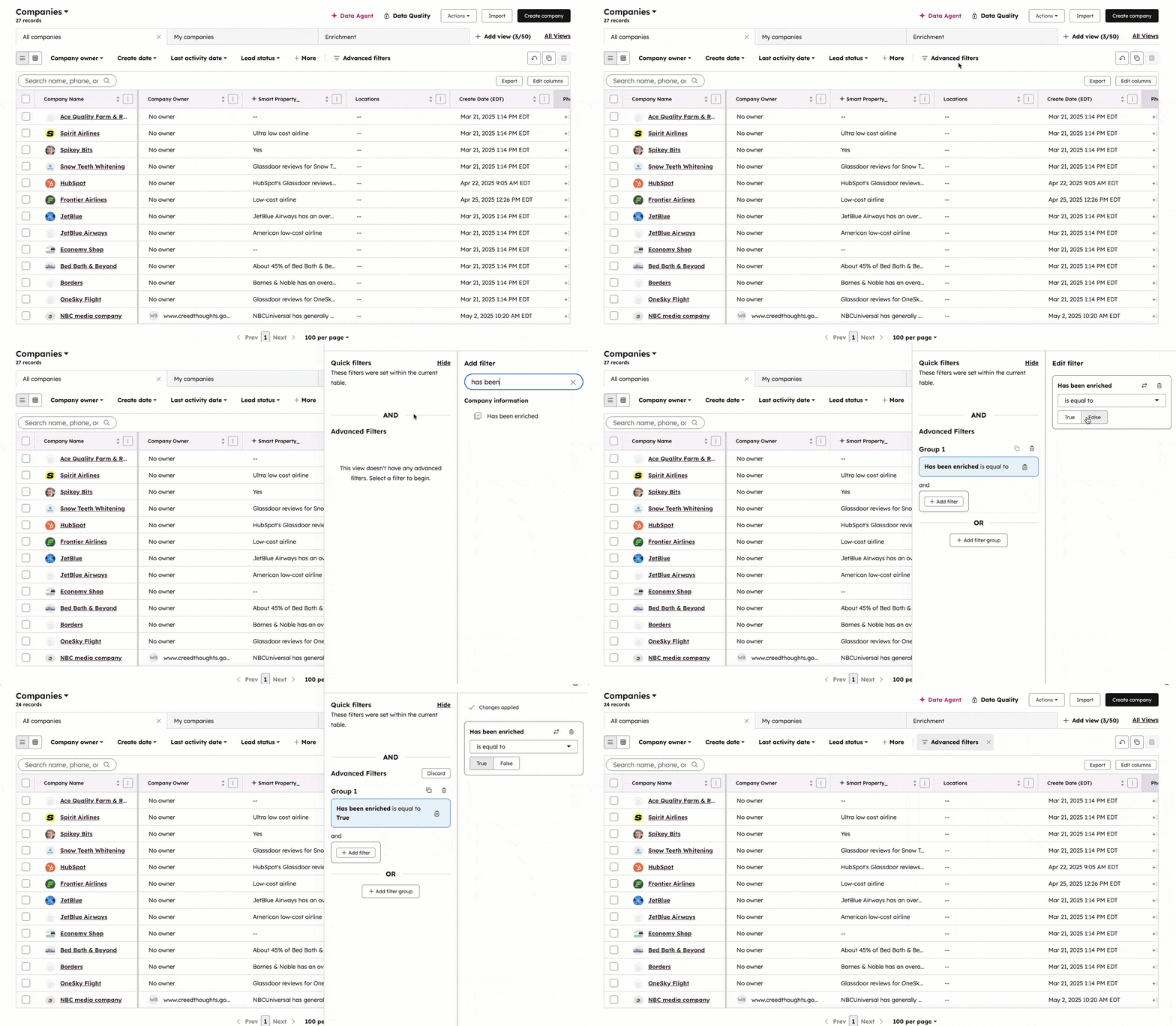
Modern enrichment tools don’t just “find emails.” They turn thin records into fully usable customer profiles. In HubSpot, enrichment typically happens across two layers: contact-level data and company-level data.
Here’s what you can actually enrich:
|
Contact properties |
Company properties |
|
|
Best HubSpot Data Enrichment Tools
Not all HubSpot data enrichment tools are created equal. Some prioritize volume, others accuracy, automation, or intent data.
Below are the 10 best HubSpot data enrichment tools in 2026, compared by pricing, strengths, and ideal use cases.
Let’s start with our top pick.
| Tool | Starting Price | Key Advantage | Rating |
| Findymail CRM Datacare | Contact Sales | Always-on data cleansing + real-time job change tracking | ⭐⭐⭐⭐⭐ |
| Breeze Intelligence | Native / Custom | Native HubSpot integration + firmographic & intent data | ⭐⭐⭐⭐ |
| Clay | $149/mo | Waterfall enrichment + advanced workflow logic | ⭐⭐⭐⭐⭐ |
| Apollo.io | $59/mo | Massive contact database + built-in outreach tools | ⭐⭐⭐⭐ |
| Cognism | Custom | Strong for EMEA data + verified mobile numbers | ⭐⭐⭐⭐ |
| ZoomInfo | Custom | Enterprise intelligence + buying intent data | ⭐⭐⭐⭐ |
| Lusha | $49.90/mo | Fast one-click LinkedIn enrichment for SDRs | ⭐⭐⭐⭐ |
| Kaspr | €59/mo | Strong European LinkedIn contact data | ⭐⭐⭐ |
| Surfe (ex-Leadjet) | $49/mo | Turns LinkedIn into a CRM with live sync | ⭐⭐⭐⭐ |
| BuiltWith | $295/mo | Deep technographic targeting & segmentation | ⭐⭐⭐ |
1. Findymail CRM Datacare: The Always-on CRM Data Cleansing and Enrichment Engine

Why Findymail CRM Datacare isn’t your typical CRM Enrichment Tool:
Most enrichment tools only fill in missing fields. Datacare goes further by continuously cleaning, correcting, and enriching your entire HubSpot database.
It automatically handles duplicates, outdated records, and incomplete contacts, keeping your CRM accurate around the clock. Datacare also tracks job changes in real time, updating profiles the moment a contact switches roles or companies. When updates happen, your team is notified directly in HubSpot or via Slack, so you never miss a high-intent opportunity.
Whether it’s enrichment, de-duplication, or full-scale data cleansing, Datacare runs quietly in the background and guarantees a 5% bounce rate or lower for all B2B contact data.
Key Strengths for HubSpot:
- Deep Contact & Company Enrichment: Enriches contacts and companies with verified emails, job titles, LinkedIn URLs, phone numbers, firmographics, and location data (live and in bulk).
- Zero-Bounce Email Guarantee: Deep email verification protects deliverability and your HubSpot sender reputation.
- Advanced Job & Company Change Detection: Automatically detects role or company changes and triggers alerts, CRM updates, or workflows.
- Continuous Data Cleansing & De-duplication: Removes invalid data, standardizes fields, merges duplicates, and keeps records aligned in real time.
- Native HubSpot Integration: Runs directly inside HubSpot (and other major CRMs) with no overlays or manual maintenance.
Ratings:
- G2: 4.9/5 (56)
- Capterra: 4.9/5 (7)
Pricing: Contact our CRM Experts

Pricing starts at $1,188/year (Enrichment only) or $1,782/year (Enrichment + Job Tracking), with pricing scaling based on your record volume. Because every CRM is different, the best first step is to set up a quick call with our CRM data specialists.
Book a session with one of our CRM data specialists and we'll securely connect Datacare to your system without altering or risking a single record. You'll get a full breakdown of what's clean, what needs attention, and exactly what it would take to bring your database back to full health.
2. Breeze Intelligence (formerly Clearbit)

Overview:
Breeze Intelligence is the definition of the convenience pick. It’s HubSpot’s native enrichment tool, which means it works straight out of the box.
Where Breeze shines is company-level context. It’s solid for firmographics like company size, industry, revenue range, and tech stack. It also adds buyer intent and website visitor insights, giving teams quick visibility into who’s engaging, without forcing prospects to fill out a form.
The tradeoff? Depth. Breeze isn’t built to be a full data hygiene or email accuracy engine. If your workflow depends on verified emails, continuous data cleaning, or real-time job change detection, Breeze will feel more like a helpful add-on than a complete solution, especially compared to an always-on engine like Datacare.
Key Strengths for HubSpot:
- Native, Invisible Integration: Lives entirely inside HubSpot, no tools to manage, no sync issues.
- Strong Firmographic Enrichment: Adds company size, industry, revenue range, funding data, and tech stack.
- Buyer Intent & Website Reveal: Identifies anonymous website visitors and surfaces intent signals directly in HubSpot.
- Prospecting Assistance: Includes AI-powered research and outreach tools tied to enriched CRM data.
Ratings:
- G2: 4.4/5 (626)
- Capterra: 4.5/5 (34)
Pricing: Starts at $9/user/mo

You can access Breeze’s most basic CRM data cleansing and enrichment features right from HubSpot's most basic plans:
- Starter Plan: $9/user/mo
- Professional Plan: $1,300/user/mo
- Enterprise Plan: $4,700/user/mo
With the only differences being price, usage limits, and control.
3. Clay

Overview:
Clay is the ultimate data orchestrator. Built with RevOps and growth teams in mind, Clay excels at list building and enrichment at scale. You can define your ideal customer profile, pull leads from multiple sources, and enrich them with emails, phone numbers, firmographics, technographics, tech stack, and even recent news into one workflow.
Where Clay really stands out is flexibility. You decide the logic, order, and conditions behind every enrichment step.
The tradeoff? Clay doesn’t guarantee data quality on its own. Accuracy depends on the providers you plug in and how you structure your workflows.
Key Strengths for HubSpot:
- Automated Data Management: Create, update, and look up HubSpot objects (contacts, companies, deals) directly from Clay.
- Context-Rich Enrichment: Instantly pull HubSpot data into Clay to enrich records with full account context before syncing back.
Ratings:
- G2: 4.8/5 (183)
- Capterra: N/A
Pricing: Starts at $149

Clay pricing starts at $149/month and scales quickly based on usage and features. A free plan is available for teams who want to test basic functionality. Here’s a quick breakdown of the rest:
- Starter: $149/mo
- Explorer: $349/mo
- Pro: $800/mo
- Enterprise: Custom pricing
4. Apollo.io

Overview:
Apollo.io is THE database giant. It pairs a massive contact database of 275+ million contacts with enrichment, sequencing, and engagement tools, making it a popular, budget-friendly alternative to enterprise solutions.
Built for high-volume outbound teams, Apollo enriches contacts and companies directly inside HubSpot, with real-time updates and synced lifecycle stages to keep prospecting and CRM perfectly aligned.
The tradeoff? Precision. At Apollo’s scale, accuracy can slip, especially for emails and job changes. The winning move is to source and outreach in Apollo, then clean and validate records before they become permanent HubSpot contacts.
Key Strengths for HubSpot:
- Massive Contact Coverage: 275M+ contacts for large-scale lead sourcing.
- Core Field Enrichment: Fill gaps like job title, industry, company size, and revenue.
- Buying & Company Signals: Enrich records with funding, job postings, technographics, and more for better segmentation.
- Automatic CRM Updates: Continuously enrich and refresh HubSpot records to reduce stale data.
Ratings:
- G2: 4.7/5 (9,360)
- Capterra: 4.5/5 (383)
Pricing: Starts at $59

Apollo uses a per-user pricing model with multiple tiers and a free plan (very limited) for each of their solutions. For data enrichment, pricing breaks down as follows:
- Basic: $59/user/mo
- Professional: $99/user/mo
- Organization: $149/user/mo
Plans scale quickly as you unlock higher data limits, automation, and team features, making Apollo accessible for small teams, but more expensive at volume.
5. Cognism

Overview:
Cognism is the king of EMEA and cold calling (specifically in Europe). If your HubSpot strategy relies on phone outreach, Cognism is one of the strongest data providers available.
It’s particularly well known for verified mobile numbers and strict GDPR compliance, making it essential for teams selling into the UK and EU markets.
The tradeoff is flexibility. Cognism is premium-priced and best suited for teams running phone-first outbound rather than lightweight enrichment workflows.
Key Strengths for HubSpot:
- Best-in-Class Mobile Numbers: Especially strong coverage across EMEA.
- GDPR-First Data Collection: Built for European compliance.
- Native HubSpot Sync: Seamless contact and company enrichment.
- Intent Signals Included: Prioritize outreach based on buying behavior.
Ratings:
- G2: 4.5/5 (1,278)
- Capterra: 4.7/5 (247)
Pricing: Book a Demo

Cognism uses custom pricing based on data volume, regions, and use case. Access requires booking a demo. All plans include contact and company data, phone-verified Diamond Data®, CRM integrations, and core enrichment features.
- Grow: Essential high-quality data for confident outbound prospecting.
- Elevate: Adds advanced intent signals, buying insights, and change alerts to help teams focus on accounts that are ready to buy.
6. ZoomInfo

Overview:
ZoomInfo is the enterprise heavyweight. It’s built for large organizations running complex, account-based strategies inside HubSpot.
Where ZoomInfo stands out is Buying Intent data. It helps teams identify which accounts are actively researching solutions, making it ideal for strategic account mapping and ABM workflows.
The tradeoff? Cost. ZoomInfo is powerful, but rarely lightweight.
Key Strengths for HubSpot:
- Rich Account Intelligence: Enrich records with technographics, revenue, firmographics, and detailed company attributes.
- Standardized Data Ingestion: Keep HubSpot clean and consistent with structured, normalized data inputs.
- Faster Lead Action: Improve lead scoring and routing with deeper account insights.
- Database Health Reporting: Monitor enrichment coverage and data quality directly through reporting dashboards.
Ratings:
- G2: 4.5/5 (8,954)
- Capterra: 4.1/5 (316)
Pricing: Contact Sales

In order to access Zoominfo’s pricing you need to get in touch with their team. Here is a quick breakdown of their sales plans:
- ZoomInfo Professional: Take prospecting to the next level with reliable contact & company data.
- Copilot Advanced: AI driven account prioritization based on unique B2B signals & deeper insights.
- Copilot Enterprise: Scale your GTM strategy through AI-generated account summaries, advanced signals & more.
7. Lusha

Overview:
Lusha is the SDR’s go-to Chrome extension. Lusha is a B2B sales intelligence platform with 300M+ business profiles, delivering direct phone numbers, emails, and company data at the click of a button.
Where Lusha really shines is speed. Its Chrome extension reveals contact details directly on LinkedIn, company websites, or inside HubSpot. It’s built for reps who live on LinkedIn and want fast answers, not complex workflows. Lusha also layers in buyer intent signals, job change alerts, technographics, and AI-powered recommendations to help teams prioritize who to contact first.
The tradeoff? Coverage. Data quality is strongest in North America and the UK. Outside those regions (especially parts of Europe, APAC, and non-English markets) accuracy and availability can drop.
Key Strengths for HubSpot:
- One-Click Enrichment: Instantly enrich HubSpot records from LinkedIn or the web.
- No Manual Copy-Paste: Reduce human error by syncing data directly into HubSpot.
- Faster SDR Workflows: Spend less time on data entry and more time actually selling.
Ratings:
- G2: 4.3/5 (1,602)
- Capterra: 4.0/5 (396)
Pricing: Starts at $49.90

Lusha uses a credit-based model that scales with usage:
- Starter: $49.90/mo (1 seat, 400 credits/mo)
- Pro: $69.90/mo (Min. 2 seats, 600 credits/mo)
- Premium: $399.90/mo (Min. 5 seats, 600 credits/mo)
- Scale: Custom pricing with credits received upfront
Plans adjust based on the number of credits your team needs.
8. Kaspr

Overview:
Kaspr is a LinkedIn-first enrichment tool with a clear sweet spot: Europe. It’s built to help B2B sales teams quickly find and verify professional emails and phone numbers directly from LinkedIn profiles.
Kaspr wins on simplicity. Install the Chrome extension, open LinkedIn, and the data just appears. There’s virtually no learning curve, which makes it a strong Lusha alternative for EMEA-focused teams. With Lusha, contacts pulled from LinkedIn can be pushed straight into HubSpot with real-time sync, eliminating manual data entry entirely.
The tradeoff? Geography. Kaspr shines in Europe, but if your prospecting is US-heavy, platforms like Apollo or ZoomInfo typically offer broader coverage.
Key Strengths for HubSpot:
- One-Click LinkedIn Enrichment: Pull emails and phone numbers directly from LinkedIn and Sales Navigator.
- Seamless HubSpot Sync: Instantly push enriched contacts into HubSpot with no copy-paste.
- Reliable EMEA Coverage: Strong data quality across European markets.
- Low Learning Curve: Fast setup, fast results.
Ratings:
- G2: 4.4/5 (830)
- Capterra: 3.3/5 (3)
Pricing: Starts at €59

Kaspr offers a limited free + starter plan, where credits are reportedly quickly exhausted. Paid plans scale like so:
- Starter: €59/user/mo
- Business: €99/user/mo
- Enterprise: Custom pricing
9. Surfe (ex-Leadjet)

Overview:
Surfe turns LinkedIn into a lightweight CRM. Built for sales reps who live in LinkedIn, it lets you enrich contacts, sync messages, and log activity without ever leaving the browser. Powered by waterfall enrichment, Surfe pulls data from multiple providers to find verified emails and phone numbers, then syncs everything directly into HubSpot.
Where it shines is usability. The interface is intuitive, the LinkedIn integration is seamless, and reps can work faster with full CRM context right on a prospect’s profile.
The tradeoff? Focus. Surfe is deeply tied to LinkedIn. If most of your prospecting happens elsewhere, its value drops. And like all LinkedIn-dependent tools, occasional changes to LinkedIn’s platform can require adjustments.
Key Strengths for HubSpot:
- One-Click CRM Sync: Instantly add LinkedIn contacts to HubSpot without duplicates or errors.
- CRM Context on LinkedIn: See lead status, deals, and tasks directly on a contact’s LinkedIn profile.
- Message Syncing: Log LinkedIn conversations automatically in HubSpot for clean follow-ups.
- Sales Navigator Exports: Push entire prospect lists into HubSpot with enrichment applied.
Ratings:
- G2: 4.6/5 (454)
- Capterra: 5.0/5 (2)
Pricing: Starts at $49

Surfe keeps pricing simple beyond its freemium plan:
- Essential: $49/user/mo (150 email finder, 50 mobile phone finder, Unlimited email validation)
- Pro: $89/user/mo (1000 email finder, 100 mobile phone finder, Unlimited email validation)
10. BuiltWith

BuiltWith is the technographic specialist. It analyzes what technologies websites are built on, tracking 85,000+ web technologies across hundreds of millions of sites.
Where it shines is precision targeting. If your HubSpot strategy depends on what tools prospects use (Shopify, Salesforce, HubSpot, Stripe, you name it) BuiltWith is essential for segmenting accounts based on their tech stack.
The tradeoff? It’s a specialist. BuiltWith tells you what companies use, not who to contact. You’ll still need an enrichment tool to get the right people data.
Key Strengths for HubSpot:
- Technographic Enrichment: Add data about the platforms and software your prospects use.
- Hyper-Specific Segmentation: Build lists and workflows in HubSpot based on tech stack criteria.
- Market Intelligence: Access broader market share and adoption trends for strategic targeting.
Ratings:
- G2: 4.3/5 (60)
- Capterra: 4.2 (29)
Pricing: Starts at $295

Pricing ramps up fast with BuiltWith, but core functionality stays consistent across tiers. The difference is usage limits and access volume.
- Basic: $295/mo (Technologies 2, Keywords 2, Retail Reports 2, System Logins 1)
- Pro: $495/mo (Technologies unlimited, Keywords unlimited, Retail Reports unlimited, System Logins unlimited)
- Team: $995/mo (Technologies unlimited, Keywords unlimited, Retail Reports unlimited, System Logins unlimited)
Final Thoughts
Your HubSpot CRM should be a revenue engine, not a digital graveyard full of outdated emails and ghost contacts.
In 2026, the difference between campaigns that perform and ones that flop often comes down to one thing: data quality. If emails bounce, job titles are wrong, or records are incomplete, your automation breaks, your segmentation lies, and your SDRs waste hours chasing ghosts.
Data enrichment fixes the foundation. Clean data means better targeting, safer sending, smarter workflows, and a CRM you can actually trust.
Get a CRM health check with our experts and see exactly how Findymail CRM Datacare can turn messy records into revenue-ready data.
FAQs
1. What is data enrichment in HubSpot and why is it essential for sales?
HubSpot data enrichment is the process of automatically adding accurate information to your CRM records (like job titles, company details, LinkedIn URLs, phone numbers, and technographics).
For sales teams, this means:
- Less manual research
- Better-qualified leads
- More personalized outreach
- Higher connect and reply rates
Without enrichment, reps sell blind. With it, they sell with context.
2. How can I ensure data accuracy when I automatically update new records?
Accuracy comes down to verification + smart rules. Use enrichment tools that:
- Verify emails before adding them
- Deduplicate records automatically
- Track job changes and outdated data
- Let you control which fields can be overwritten
The goal isn’t just more data, it’s clean, validated data flowing into HubSpot in real time.
3. Does HubSpot Breeze Intelligence provide the same value as third-party enrichment tools?
Breeze Intelligence is convenient because it’s native to HubSpot, and it works well for firmographic basics like company size and industry.
However, third-party tools (like Datacare) often provide:
- Stronger email verification
- Better phone number coverage
- Job change tracking
- Deeper technographic and intent data
Think of Breeze as a solid baseline. Specialized enrichment platforms go deeper and are often more reliable for outbound use cases.
4. Can I sync my existing records without overwriting manual updates?
Yes. Most advanced enrichment tools allow field-level control. You can choose to:
- Only fill empty fields
- Update outdated data
- Protect manually entered values
- Log changes in custom fields
This keeps your CRM improving automatically without erasing important human input.
5. How does enriched data improve marketing and form shortening?
Enriched data lets you ask less and know more.
Instead of long forms, you can collect just an email or company domain and enrich the rest (company size, industry, location, etc.) behind the scenes. That means:
- Higher form conversion rates
- Better segmentation
- More accurate lead scoring
- Stronger personalization in campaigns
Shorter forms = more leads. Enrichment makes those leads usable.
6. Is it possible to perform bulk enrichment on my outdated dataset?
Absolutely. Most enrichment platforms support batch or bulk processing.
You can upload hundreds(or thousands) of old HubSpot records and:
- Validate emails
- Remove duplicates
- Update job titles and companies
- Add missing firmographic or technographic data
It’s one of the fastest ways to turn a stale database into a usable pipeline source again.

Valentin
Valentin Wallyn is the founder and CEO of Findymail, a SaaS platform he launched to help B2B teams discover accurate email and contact data and automate data enrichment at scale. With an IT background, Valentin combines a technical mindset with hands-on experience in outreach and growth. His work centers on improving data quality and prospecting efficiency, drawing on years of entrepreneurial experience and a deep understanding of what makes outreach campaigns succeed.